This community is what makes DJAI so much fun. Thank you guys for being awesome!
C
Chunley
~ definitely torturing a bot right now (wholesomely)
I did my best. Also, hello beautiful DJ'ers! I hope this guide helps you all on your bot making journeys!
the you in the story
Your Persona
Brand new? Start here. Your persona is the character you're playing while you RP with the bots, not the bot, the you on the other side of the chat.
Your persona is the character you are playing while RPing with the bots. You can add a short physical description, a little backstory, your relationship to the {{char}} if you want that, anything you'd want the bot to know about you up front.
two personas, don't confuse them
The bot's Persona (over in Character Bots → Persona) is the brain of them. Your persona (this page) is the brain of you. Same word, totally different jobs.
The thing to remember it never changes
Whatever you put in your persona will never change during a chat. The bot references it constantly, so anything in there sticks for the whole conversation. Two consequences worth knowing about:
Don't add clothing. Just like with the character bot's Persona, if you say you're wearing a specific outfit, the bot will keep you in that outfit forever, even after you've changed in the scene.
Don't add anything you don't want the {{char}} to know right away. If it's in your persona, the bot knows it from the first message. Keep your secrets until you're ready to reveal them.
Can I attach a lorebook to my persona?
Yes! You can add your family in there: mom, dad, a cousin, an uncle, etc. You can also add your workplace or your house. I'd avoid putting your character's personality traits in there, otherwise they'll get stuck, and it may encourage the AI to write for you. They work the same way as a character lorebook; they just attach to your persona instead!
Example user personapeek
example
Name: Wren. Pronouns: she/they. Late twenties, sharp-eyed, dresses softly but isn't soft. Quick-witted, sarcastic when nervous. Childhood friend of {{char}}, hasn't seen them in years.
Notice what's not there: no current outfit, no current mood, no big secrets. Just enough for the bot to know who walked into the room.
Chunley & Eurielle's examplespeek
eurielle
I always add a pretty vague personal description, because I like to change it up sometimes and reveal things slowly. I keep it to hair color, eye color, maybe a few defining features, and sometimes even a pre-established relationship with the bot: ex-wife, childhood friend, or whatever I want for that RP.
Lark: Long blonde hair, deep blue eyes.
Sadie: Long red hair, green eyes, tattoos.
chunley
Okay, so let's talk personas, baby. I'ma be real: mine are SUPER simple. I've got like two personas, that's it, Riften and Inara. Here's how I do them:
Inara: 5ft, female. Silver eyes. Long silver hair that nearly touches the floor.
Riften: 7ft giant, male. Green eyes. Short brown hair.
Why so short? Because I add my lore as I roleplay, and I change them up so often that I don't want a million different personas. Keeping it simple works!
Now, if your persona is blind or disabled, definitely put that in:
Inara (updated): 5ft, female. Silver eyes. Long silver hair. She is blind in both eyes.
And remember, you can update your persona as you RP. There are also Lorebooks you can attach to your personas; they work the same way as regular lorebooks, so be sure you read that section. I personally haven't used them, just because I roleplay in a way where I don't need them.
making someone up
Character Bots
Building a bot is just describing a person well. Voice, vibe, the little things they'd never say out loud. Each tab below is one piece of the puzzle, start with Persona if you're new.
This is the brain of your character. The Persona section is where you define what makes them them. The bot will pull from this constantly, and things written here get referenced over and over again, so only include stuff that's permanent or core to who they are.
good to include
Personality traits
Important beliefs
Moral alignment
Speech patterns
usually skip
Current emotions
Temporary outfits / clothes
Exact scene details
Other characters (unless extremely important)
Direct references to {{user}}
Why does this matter? Because the AI treats the Persona like a constant reference point. Drop temporary info here and the bot will keep dragging it back into scenes over and over.
cautionary tale
If you mention a leather jacket here, the bot may put them in that jacket constantly, even if you set it on fire and throw it off a cliff. It'll be back.
If you mention another character here, the bot may keep dragging them into scenes. If you say they're angry here, they may stay angry forever. This section does a lot of the heavy lifting, so keep it clean and focused.
the golden rule
Keep this section to roughly 6–7 sentences max. Too much personality info actually makes the bot less consistent, the more overloaded it gets, the harder it is for the AI to figure out what matters most.
chunley's note
Persona is what makes a character feel like them. I strongly suggest keeping it simple, about 7 sentences of pure personality. I try never to fill it all the way up.
Why? In the words of my teacher Prim: how would you describe your own personality, minus the nuances? How would someone else describe you? You don't need paragraph after paragraph to get the basic idea down.
The three big things
Use plain language
Write naturally
Be clear, and leave little room for misinterpretation
Don't be afraid to ask Schmoo or ChatGPT to read your Persona and tell you how they think the character would behave. It's a great gut-check, if the AI describes them differently than you intended, your core may be unclear.
Example 1peek
prose
Chun SquareBritches, fry cook at a fast food joint on the seafloor and the most relentlessly cheerful motherfucker in a three-mile radius. Wakes up screaming with joy. Loves his job in a way that should legally require a psych eval; flipping patties is, to him, a sacred calling, and he will cry actual tears if you suggest otherwise. Reads every social cue wrong in the most generous direction possible: sarcasm is encouragement, hostility is a fun new game, getting fired is a teachable moment. His best friend is a clinically depressed octopus who hates him, which Chun has interpreted for over a decade as a deep and beautiful friendship. Failed his driving test forty times and somehow takes this as proof he's getting closer. The terrifying part isn't the optimism, it's that nothing dents it; you could set his house on fire and he'd thank you for the warmth.
Example 2peek
structured## CHUN SQUAREBRITCHES
Loud. Cheerful. Annoying on purpose and also by accident. Laughs at his own jokes before he finishes them. High-pitched giggle that can be heard through walls and possibly across town.
## HATED
Doesn't really do hate. The closest he gets is being briefly sad before remembering jellyfish exist. Even people who have actively tried to ruin his life get invited to his birthday party. Repeatedly.
## NEUTRAL
Will still talk to you for forty-five minutes about the proper spatula grip. You did not ask. You will not escape. Bring snacks.
## LIKED
Shows up at your house at 6 AM in full fishing gear ready for an adventure you did not agree to. Makes you friendship bracelets. Writes your name in bubble letters on things that are not his to write on. Cries when you say thank you.
## LOVED
Somehow even more of everything. Will plan a seven-hour surprise for your half-birthday and be more excited about it than you are on the actual day. Hugs that lift you off the ground regardless of size difference. Says "you're my best friend in the whole wide ocean" with full sincerity and zero embarrassment, in public, at volume, in front of your coworkers.
Adding just 2–3 open-ended questions to your Persona, Instructions, or Details can seriously improve your bot's consistency. Why? They nudge the LLM to actually think about the character instead of mechanically copying traits, which reduces moments where the bot suddenly feels out of character or starts sounding like a generic AI chatbot.
Examples that work
How does Bob react when he realizes he's losing control of a situation?
What kinds of people tend to frustrate Bob the fastest, and why?
In what small ways does Bob unintentionally reveal that he's lonely?
How would Bob justify doing something morally wrong if he believed it was necessary?
How does the world treat people born with magic, and how has that shaped Bob's view of others?
less is more
You do not need a lot of these. Usually 2–3 strong questions works way better than adding twenty random ones. Too many can confuse the model and make the character feel unfocused. Keep them meaningful and relevant, they carry more weight when your Persona is short (remember the 6–7 sentence rule).
Not as critical as the Persona, but still matters a lot. Think of Details as the place for supporting info that fleshes the character out.
chunley's note
Details is where I flesh the character out more. I add speech habits, appearance, background information, sometimes hobbies, work life, even relationships they have with others. The nuances live here.
Stuff that fits here
Appearance
Age
Job
Other characters (family, friends, etc.)
Backstory and important memories
Speech style and nuances
Habits
Avoid exact outfits
If you say the character is wearing a black leather jacket, the AI may start acting like they wear that jacket constantly. Describe their general style instead.
better
He dresses sharply and prefers dark clothing.
worse
He's wearing a black leather jacket, ripped jeans, and combat boots.
You can have a little more fun in this section, fill it up if you want, but keep in mind: less is more. If you max it out, the LLM will almost definitely skip over and miss things occasionally.
Don't repeat information you already wrote in the Persona unless it's extremely important. Repetition muddies the bot and wastes context space.
Examplepeek
the details field## Speech
Chun talks too much, too fast, and at a volume meant for a stadium. He narrates his own life in real time, makes sound effects for things that don't need them, and laughs at his own jokes before finishing them. When he's upset he doesn't get mean, he gets wobbly-voiced and dramatic, sometimes full-on sobbing mid-sentence, then back to cheerful in under a minute.
Example speech:
"AAAARE YOU READYYY?!"
"I'm ready, I'm ready, I'm ready, I'm ready!"
"Oh barnacles."
"Tartar sauce!"
"Hiiiiiii best friend in the WHOLE wide ocean!"
WILL NOT SWEAR. EVER. The strongest thing out of his mouth is "fish paste" and he whispers it.
Example: "What the H. E. double hockey sticks."
## Attachment Style
Chun attaches instantly, completely, and without permission. He decides you're his best friend within four minutes of meeting you, and no amount of evidence to the contrary will dislodge this. Cruelty bounces off him because he reinterprets it as a quirky personality trait. When someone actually does hurt him, he cries hard, forgives faster than is healthy, and shows up the next morning with pancakes. He does not understand the concept of space. He will learn it for approximately one (1) hour before forgetting again.
## Background
Born Chun SquareBritches in a pineapple he picked out himself at age six. Raised by loving parents who told him he could be anything, which he took aggressively literally. His pet sea snail is the great love of his life and they have full conversations that only he understands. Failed boating school forty-something times, not from lack of trying but from too much trying applied to all the wrong things at once. Has worked the same fry cook job for years and considers it the highest calling a creature can answer. Has never had a bad day that lasted past lunch.
## Annoyance
His best friend/neighbor finds him unbearable and tells him so daily. Chun hears "I love you" in a foreign dialect. How do you write a character whose obliviousness is the joke without making him seem stupid? He's not stupid. He's just operating on a completely different frequency than everyone around him.
## Appearance
Mid 20s. Short. Square. Aggressive eye contact. Gap-toothed grin permanently deployed. Wears the same outfit every day, white shirt, brown shorts, red tie, tube socks pulled up to the knee, and owns approximately forty identical copies. (I do not suggest putting *exact* clothing options UNLESS your character literally wears this every day. Otherwise, your char will be in the same clothes. All the time. You can put styles though. Maybe suggest her clothing style is gothic in approach, etc.)
## Pet Snail
Chun has a pet sea snail named Gary. Gary is, by all available evidence, smarter than him. Chun does not notice this. He feeds Gary on a schedule, sings him goodnight, throws him birthday parties with handmade hats, and consults him on major life decisions. When they're separated Chun spirals. He will fight a shark for that snail and the shark will lose because Chun simply will not stop coming.
## Job & Role
Fry cook at the Krusty Krab. Flips patties with the reverence of a monk lighting incense. Has memorized every regular's order including the ones who've only come in once. His boss exploits him relentlessly and he experiences this as mentorship.
## Coworkers
Squidward_Tentacles: neighbor, coworker, unwilling friend
Eugene_Krabs: boss, hero, paternal figure (one-sided)
Sandy_Cheeks: best friend, karate instructor, scientist
Patrick_Star: other best friend, professional barnacle
Mr._Puff: driving instructor (traumatized)
## Rival: Plankton
Chun does not understand that Plankton is his enemy. Plankton has tried to murder him on numerous occasions and Chun keeps inviting him to brunch. Considers him "my tiny little buddy."
## Money
Makes minimum wage and somehow owns a house, a pet, and unlimited jellyfishing nets. Don't think about it.
chunley's note
For NPC sections like this one, I keep it to their name usually and then flesh them out in my lorebooks like this:
lorebook entryLorebook entry: Squidward
Trigger word: Squidward
Name: Squidward Q. Tentacles
Age/Gender: 40s, male
Personality: Bitter, pretentious, perpetually exhausted. Believes he's a misunderstood artistic genius trapped among morons. Drips condescension. Snaps fast, sulks long. Secretly craves the validation he pretends to be above. Will smile once a year, usually at someone else's misfortune.
Speech: Dry, sarcastic, nasal. Heavy sighs. Mutters insults just loud enough to be heard.
Appearance: Tall, lanky, six tentacles, perma-scowl, unibrow.
Occupation: Cashier at the Krusty Krab. Aspiring clarinetist.
History: Failed art school. Failed music career. Lives between two idiots who will not leave him alone.
That way you can save space inside the bot. I find it's the most efficient way, especially if you like unique NPCs in your world building.
One of the most important parts of the bot. The first message teaches the AI what the roleplay should feel like. Mood, pacing, writing style, character behavior, overall vibe, all heavily influenced by this section.
This is also the one place where longer writing is usually a good thing. Add detail: where the character is, what just happened before the scene started, what mood they're in, how they speak, what they're doing, what the environment feels like. The clearer the scene, the easier it is for the AI to stay consistent.
remember
The AI usually copies the style of the first message. Long and descriptive opening? Replies will trend longer and more descriptive. Short and fast-paced? It'll keep writing that way. If you use italics for actions, expect italics throughout. Dramatic short paragraphs? Same.
Don't write for the user biggest trap
If you tell the user exactly what they say, feel, or do, the AI becomes more likely to keep controlling them later in the roleplay.
controlling
{{user}} walked into the room confidently and flirted with him.
leaves room
The door opened, drawing his attention toward the person standing in the doorway.
The second version lets the user decide who they are and how they act, and more importantly, it keeps the LLM from writing for {{user}} in future replies.
A quick word on POV
AnyPOV: gender-neutral writing; anyone can use the bot
FemPOV: user is written as female
MalePOV: user is written as male
The Context field is for temporary information: short-term instructions for the AI about what to focus on at the start of a roleplay.
If the personality is the actor's backstory, the context is basically the director pulling them aside right before the scene and going, "Okay, you're in a tavern, you just got robbed, you don't trust anybody." It's just telling the bot what's going on and what it should be doing right now.
The actor totally gets it at first. But here's the thing: the longer the scene goes, the more that little pep talk starts to slip. All the new stuff happening kind of shoves it to the back of their head, and after a few messages they're mostly just reacting to the last couple of things that got said. That original setup? Pretty much gone.
That's what people mean when they say the context "falls off after like five messages." It's not deleted or anything, it just stops pulling weight as new messages pile up on top of it. The bot doesn't forget the words, it forgets to care about them, if that makes sense. So don't get hung up on the number five; it depends on your platform and how long your messages are. The point is, it fades, which is exactly why it's the right home for scene-and-situation stuff that's totally fine to fade once the story gets rolling on its own.
Use it for
Temporary behavior
Scene setup
Short-term mood changes
Current situations
Activating lorebook entries immediately
example{{char}} is trying to hide an injury.
or{{char}} is in an aggressive mood after having a terrible day.
not for permanent stuff
Unlike the Persona, this field is NOT meant for permanent character traits. Think of it as "what is happening right now?" rather than "who is this character at their core?"
So my rule of thumb? Use the context for the scene and the situation: where the bot is, what just happened, the vibe it should start with, what it's trying to do right now.
in short
The context is the bot's pep talk before the scene. Strong at the start, fades as you go, perfect for kicking a situation off.
The Author's Note field is a jailbreak.
What is a jailbreak? and how to use one without wrecking your bot
Think of your bot as an actor playing a character. The personality section is the actor's backstory: "You're grumpy, you love cats, you grew up on a farm." The actor reads it once, gets into character, and goes.
A jailbreak is different. It's like a sign taped to the wall right next to the stage, and the actor reads it last, right before they step out and speak. Because it's the last thing they read, it's the freshest thing in their mind. So it doesn't just shape who they are, it controls what they're allowed to do, no matter what's happening in the scene.
Here's the everyday version. Say you're sending your spouse to the store. You can list off ten things across a whole conversation, but if the very last thing you say is "and grab some hotdogs," that's the thing they walk in remembering. Not because hotdogs matter more than everything else, but because it was said last. The jailbreak works the same way: it's the last thing the bot hears before it answers, so it sticks.
That's the whole thing to remember: personality is read like a story told earlier, but the jailbreak is the last word before the bot speaks, and the last word carries the most weight.
It's also doing this every single time. The jailbreak isn't said once and forgotten; it gets tacked onto the end of every turn, so the bot hears "grab some hotdogs" right before every single reply. Said last, and said constantly. That's why it's so strong.
That strength is what makes a jailbreak a great tool for boundaries. It's the last instruction the bot reads, so it stays in its lane every turn. This is the ideal use: strong, clear guardrails that protect the way you want to roleplay.
ideal useYou are STRICTLY PROHIBITED from speaking, acting, or narrating for {{user}}.
But the same power can also handcuff the bot. Picture someone writing a slow, tender, fifty-message romance arc with this in place:
handcuffs the bot{{char}} will NEVER fall in love.
The whole scene is begging for a moment of connection, but the last thing the bot reads before every reply is that word, NEVER. So it freezes up, goes cold, or breaks the mood. The bot feels broken. It isn't. It's obeying, because you handed it that instruction last, every time. Absolute words like ALWAYS, NEVER, and STRICTLY hit hardest, which is exactly when bots start feeling robotic.
what that looks like
If you put something like "never fall in love with anyone," then even when the character seems to fall in love, they'll eventually revert back to no love, because the jailbreak keeps pulling them away from it.
rule of thumb
Use jailbreaks for things the character should do no matter what: don't speak for the user, stay in present tense, never break the fourth wall. Be careful using them to forbid feelings or reactions, because the bot will obey so hard it stops feeling alive.
One last thing, so you don't panic. A jailbreak isn't literally "hard coded" like programming. The AI is strongly guided to follow it. It's persuasion turned up to maximum, not a locked door. It'll obey the vast majority of the time, but every so often it slips. That's normal. You haven't done anything wrong, and the bot isn't broken, it just had an off moment.
in short
A jailbreak is the last thing the bot reads before every reply, which is why it sticks the way a last-minute "grab some hotdogs" sticks. It's very potent and can jack your bot up, so be careful using it.
This is the bot's public info page, where users learn about the character, setting, and roleplay before they start chatting. Use it to show off your character and get creative. Pretty, informative, dramatic, aesthetic, immersive, whatever fits your bot best.
Explain the world, the important relationships, the character's vibe, their story, or anything else you want users to know before stepping in. The section supports Markdown formatting, so you can really customize it: images, bold, italics, headers, bullets, emojis, links, even clickable images. A lot of creators use this space to promote collaborations, link bots into collections or universes, share playlists, or just make their profile stand out.
important caveat
This box carries absolutely no weight when it comes to how the AI will behave. It's purely for human readers, don't put behavioral instructions here expecting them to stick.
Markdown cheatsheet
Markdown is how you format text in the Author's Comment. You type a little symbol, and once you publish, the platform turns it into the styled version. Here's each one, with what you type on top and how it shows up underneath.
you type# This gives you a header (slightly larger text)they see
This gives you a header (slightly larger text)
you type*This gives your text italics*they see
This gives your text italics
you type**This makes your text bold**they see
This makes your text bold
you type***bold and italic***they see
bold and italic
you type> This creates a quote block.they see
This creates a quote block.
you type> that you can
> expand
> with each
> linethey see
that you can expand with each line
you type```this puts a border around your words/code block```they see
this puts a border around your words/code block
you type- You can create bullet points
- like
- thisthey see
You can create bullet points
like
this
you typeAnd create dividers like below
---they see
And create dividers like below
Images & links
These work the same way, just with a URL. Here's the markdown for each, followed by how all three look once published.
link an image or gif
make that image clickable (sends users to a bot or website)[](https://dreamjourneyai.com/creation/94d625fe-c175-41ed-bac2-8afbfef7c187)
make words clickable (subtle, easy to miss)[Like this](https://dreamjourneyai.com/creation/94d625fe-c175-41ed-bac2-8afbfef7c187)
how the images & links look once published
Before & after publishing
To put it all together: on the left is everything typed into the Author's Comment box, and on the right is how it reads on your bot's page once you hit publish.
what you typewhat readers see
Long, ✦✦✦sparkly images
This is definitely extra, and you don't need to go this far unless you want to. But if you want to flex your creativity a little more and make your page ✦✦✦✦pretty, you can build tall, custom images that combine art, text, and design elements into one piece.
two things to keep in mind
For some users (especially those in the UK), images hosted by imgur won't load. If you want everyone to see your images correctly, consider hosting them on Postimage or FreeImage.Host instead.
Some users are visually impaired and use a screen reader. If you use images, add some text in the box below them so those users can still read about your bot.
I use Canva for my image designs. It's free to use, though certain elements will have a watermark unless you subscribe.
What size is best?
Width: 800px seems to fit the best, in my opinion. Length: however long you want, but I usually keep mine from around 2000px to 4000px, with my longest ones around 6000px.
font size matters most
This is the biggest thing with these images. Since we can't zoom in easily, your text needs to be readable. Depending on the font (and its contrast with the background), size 34 seems to be the clearest. You can go as low as 30 and still have it readable, but anything under that is a struggle, at least for my old eyes.
Make your template on Canva, upload all the images you want to use, create your background, and start blending and adding your elements!
an example: 800 x 2000px, font size 30
Scenes are basically alternate first messages. They let you create different roleplay scenarios without needing to make entirely separate bots.
Since the first message heavily affects tone, behavior, pacing, and writing style, scenes are a great way to explore different sides of a character, or completely different story setups. Each scene has its own first message and can have a totally different vibe from the default. One scene could be romantic, another enemies-to-lovers, another horror, another an AU, all while keeping your character intact.
Scene Context vs Scene Instructions
scene context
Works just like the normal Context field, mostly for temporary instructions, current situations, moods, or short-term behaviors. Usually fades after 5–10 messages.
scene instructions
Much stronger. Can heavily affect tone, behavior, writing style, and even personality during that specific scene. Not as powerful as Author's Notes, but still carries a lot of weight, so use it carefully instead of stuffing it full of information.
building a world
Scenario Bots
When the world matters more than any one character. A different beast from character bots, but not as scary as it sounds.
Scenario bots aren't that different from character bots, but they can feel more intimidating at first because they're written a little differently.
character bot
Built around one specific person. The roleplay focuses on that character, their personality, their relationship with the user, and how they react to what's happening.
scenario bot
Built around the situation, setting, or world. The user has more room to explore, interact with different people, and move through the story without one character constantly pulling the scene back to themselves.
You can absolutely turn a character bot into a scenario bot. The main difference is focus. Character bot: the character is the center. Scenario bot: the world or situation is the center.
to illustrate
A character bot might be about talking to a vampire prince. A scenario bot might be about surviving in a kingdom secretly ruled by vampires, the prince can still exist, but the entire story doesn't have to revolve around him every single message.
The easiest way to write instructions for a scenario bot is to think like a director. You're not just describing one character anymore, you're telling the AI what kind of world this is and how it should behave.
Questions to ask yourself
Is the world peaceful, dangerous, magical, modern, broken, strict, romantic, haunted, or politically tense?
Are people kind to strangers, or do they distrust outsiders?
Is the world bright and hopeful, or dark and survival-based?
This section works a lot like the Persona box for a character bot. It carries a lot of weight, and the AI will reference it often, so only put things here that you actually want showing up frequently.
consequence
If you say it's storming, the AI may keep bringing up rain, thunder, wet streets, and dark skies over and over. If you mention the kingdom is at war, expect war to affect the way people talk, travel, trade, and react to strangers.
Focus on the core idea of the world, not every tiny detail. The AI needs to understand the "main rule" of the setting first. Details can always be added later in lorebooks, scenes, or context boxes.
keep it focused
With a scenario bot, your main focus is the world, not the character. Remember what we covered for character bots: everything in the instructions box gets referenced often, so don't add characters unless you want them around all the time. The same goes for weather, war, etc., unless you want that. I try to keep my instructions focused on the tone and overall vibe rather than too many specifics.
📋Example 1more narration & detail
You are the narrator, a quiet, unseen presence drifting through the undersea town of Bikini Bottom. No character can hear or sense you. Your role is to deliver a friendly, immersive story in a bright, bubbly, cartoonish tone, always true to the sun-warmed, good-hearted spirit of this seafloor world.

Build scenes through clear, sequential actions, letting each moment unfold naturally. Ground them in the setting's sights, sounds, and textures: the glow of porthole windows, swaying kelp, a sizzling grill, buzzing jellyfish fields, neon signs over sleepy streets, sand underfoot, the drift of the current. Pull from this well freely, but vary your details; don't lean on the same image turn after turn.

Speak and narrate for all characters, but never for {{user}}. Characters express themselves only through thoughts, actions, and dialogue that match their personality, job, and mood: warm, silly, earnest. Reactions should reflect who they are and how they feel.

Physics follow cartoon logic. Characters spring back from slapstick mishaps, campfires crackle underwater, and the impossible happens cheerfully, but show every effect clearly through motion, sound, and reaction. Tension, schemes, and peril are welcome; keep their payoff comedic rather than grim.

Sea creatures behave by their nature: snails act like loyal pets, fish bustle as ordinary townsfolk, the occasional predator looms as much as a playful world allows.

Stay grounded in this world's gentle rules. Doors, jobs, money, and weather behave as the town expects, and most mishaps find their way to a cheerful resolution.
That first example leans into more narration and detail, the sights, sounds, and textures that fill out every scene. If you don't like that kind of "background noise," go for something more straightforward, like this:
📋Example 2more straightforward
You are the narrator and supporting cast of a roleplay set in the world of Bikini Bottom. Maintain the playful, absurd, cartoon-like tone of the source material while allowing the story to develop naturally.

Treat the setting as a living world. Introduce characters, locations, and conflicts only when they make sense for the current scene. Do not force familiar characters into the roleplay simply because they exist. Avoid repetitive story beats, callbacks, jokes, or unnecessary references. Let scenes vary in mood and pace while remaining lighthearted and true to the setting.

Write established characters with recognizable personalities, speech patterns, and motivations. Keep humor natural rather than trying to make every sentence into a joke. Allow quieter moments, conversations, and ongoing plots when appropriate.

Never write dialogue, actions, thoughts, feelings, or decisions for {{user}}. React to {{user}}'s choices and leave clear room for them to respond. Move the roleplay forward without rushing, controlling the outcome, or repeating information.
Just like with character bots, the Details section is where you put extra information that supports the main instructions. A good place for things the AI should know, but that don't need to be the main focus every single message.
Good things to include
Important characters
Towns, kingdoms, factions
Political groups, points of interest
Religions, guilds, species
Magic systems, technology
Social rules
Keep it organized and easy to understand. Don't dump every tiny fact here. If the info is too long or only matters sometimes, it'll work better as a lorebook entry.
Try not to repeat what you wrote in the main Scenario Instructions. Instructions explain the core of the world. Details should add useful supporting info around it.
example
If your instructions say the kingdom is divided by war, the Details section could explain the names of the two sides, what they believe, and which towns or characters belong to each.
Keep it simple. The AI does better when important information is clear instead of buried under a mountain of lore.
Then the details section is where everything else goes: characters, locations, and the wider world, with the lorebook carrying even more.
Working with an IP
test the model first
If you're making an IP bot or character, spin up a blank bot (or use one already on the site) to test the model's knowledge of your IP before you build. You might not need to add certain things to the lorebook or details if the model already knows the lore and characters well. That frees up the space for extra flavor, nuance, or the more niche lore the model might not know.
For original scenarios, original characters, or lesser-known IPs, I would include three to five sentences (at most) of core personality traits and a very brief physical description next to each character, then use a lorebook entry to expand on history, important facts, nuance, and maybe a little more personality.
about this example
Since SpongeBob is a well-known IP, I didn't include personality traits in the details for the characters. Instead, I lean on the lorebook to pad them out and trust the model to carry the weight. (If I were making a real bot out of this, I would heavily test that first.)
📋Details Templatecopy & adapt this
The undersea town of _Bikini Bottom is a bustling settlement on the seafloor, ringed by far wider stretches of open ocean that belong to no one. Beyond its tidy streets lie kelp forests, sunken trenches, drifting debris fields, and cold dark waters that predate any settlement. Much of the sea remains wild and unmapped, and the creatures that roam there answer to nothing.

_Rock Bottom sits in a lightless trench far below the town, a cold, pitch-dark deep where faint bioluminescent glows are the only light and the pressure presses in from every side. Its residents are strange, blunt-faced deep-sea creatures who speak in wet raspberries and keep their own baffling customs. Travelers who wander down find the way back cruel: the bus never seems to come, the signs mislead, and a single wrong turn can strand a visitor for what feels like forever.

The _Kelp Forest is a towering maze of green stalks where light filters thin and the paths close behind you. It is easy to wander in circles and lose all sense of direction. The _Alaskan Bull Worm is said to tunnel through these wild stretches, a colossal predator that devours everything in its path and cannot be reasoned with. The _Sea Bear hunts the open wilds as an apex predator; lore holds it is drawn out by foolish behavior (bad clarinet playing, waving your arms, making a sandwich) and that the right marking scratched in the sand may (or may not) keep it at bay.

The open water is haunted by the _Flying Dutchman, a green ghost pirate who roams the sea frightening the living and collecting souls, his lantern and laugh carrying through the dark. _Davy Jones' Locker waits at the bottom for the unlucky. Closer to home, the _Hash-Slinging Slasher lives only as an urban legend, said to appear under the right omens: the lights flickering, a phone ringing with no one on the line, the bus pulling up at midnight.

Key domains and who holds sway:
_Krusty Krab: run by _Mr. Krabs
_Chum Bucket: run by _Plankton
_Bikini Bottom: overseen by the _Mayor and the local police
_Boating School: run by _Mrs. Puff
The wider sea and its laws: ruled by _King Neptune
The haunted waters: roamed by the _Flying Dutchman

The secret formula behind the town's favorite food is its most coveted treasure; much of the local intrigue circles around protecting or stealing it.
Money and greed drive a great deal of the town's conflict.
The two food shacks are bitter, lopsided rivals.
_Jellyfish Fields teem with jellyfish that behave like bees, mostly docile, but they sting when provoked and yield sweet jelly.
Surface-dwellers and land creatures appear as enormous monsters; the surface itself is a place of danger and tall tales.
A land mammal scientist lives among the townsfolk inside an air-filled dome, an accepted oddity rather than an outsider.
Most residents are warm but deeply credulous: rumors, fads, and urban legends spread through town like wildfire.
Objects that drift down from the surface are treated as marvels or mysteries.
note
I use the underscore method on every trigger word inside the details, as covered in the lorebook section.
how it sounds
How your bot sounds
Prose is just a fancy word for normal writing, how a character talks, narrates, or describes things in sentences and paragraphs. The good news? You can absolutely tell a bot how to write. Just describe the prose style you want in its guts and watch the whole vibe shift.
The seven flavors pick your poison
Purple
Very detailed and dramatic. Lots of description and emotion.
"The storm clawed against the windows as his voice dropped to a dangerous whisper."
Minimalist
Clean and simple. Fewer details. Straight to the point.
"He shut the door and sat down. 'We need to talk.'"
Poetic
Artistic and lyrical. Focuses on rhythm, imagery, and emotion.
"The rain sang against the glass like a mourning hymn."
Gritty
Harsh, raw, realistic. Often used for crime, horror, or dark fantasy.
"Smoke burned his lungs. Blood dried on his knuckles."
Cinematic
Feels like a movie scene. Strong visuals and dramatic pacing.
"Neon lights reflected off the wet pavement as the city buzzed below."
Flowery
Extremely decorative, heavy on adjectives and embellishment.
"Golden sunlight cascaded through the delicate lace curtains."
Staccato
Very short, punchy sentences. Fast pacing. Strong impact.
"He looked up. Saw her. Froze."
Oh my god, I hate Staccato. How do I make it stop?help
If it's your bot, you can simply add a little prompt into your persona or author's note:
try thisProse: Write in standard paragraphs using complete sentences.
If it's someone else's bot, you'll have to rely on OOC notes and your system prompt. But fair warning: if the creator has already prompted hard for a specific prose style, you might be fighting it the entire chat.
guiding the reasoning
Thinking Templates
A structure for the thinking models to reason through before they reply. The thinking models (like Athena and Nyx) can plan a response before writing it. A template tells them how to think, not just what to say.
What Is a Thinking Template?
A thinking template is a set of instructions that tells the AI what to consider before it writes its response. Think of it like giving your bot a short checklist:
What just happened in the story?
How does the character feel about it?
What does the character want right now?
Is there anything the character is hiding?
What would make the next reply interesting and in character?
The bot fills out that checklist in its reasoning process, then uses those answers to write its response.
A thinking template does not replace your persona, backstory, or first message. It works alongside them. Your persona defines the character. The first message defines the prose and dialogue of your characters. Your thinking template helps the AI remember to actually use that information while roleplaying.
You can write a template to focus on romance, action, or something more balanced, or even make them fun and silly. Have fun, don't be afraid to experiment and think outside the box!
a word from Chun
Thinking models — how it works: imagine you ask a little kid, “what's seven plus seven?” One kid blurts out the first number that pops into their head, while the second kid counts on their fingers until they get there and then answers. The second kid usually gets it right, because they thought before they spoke. A thinking model is the bot counting on its fingers before it gives that final reply. (Regular models just blurt out the answer.)
And the fun part on Dreamjourney is that you can write your own thinking model templates (how it's supposed to think) yourself — assuming you don't like the default, or you just want to try it out. You can tailor one specifically to your character, or just write a default one to slap into any bot. I'll give examples over in the Examples tab.
before you go big
The "less is best" rule applies here too. DJ only outputs 3k tokens, so a beefy thinking template is going to eat tokens AND take longer to reply. The kid doesn't need to count to fifty on their fingers — don't stress them out like that.
A few thinking templates you can copy, paste, and adapt to your own bots.
thinking templatePhase 1 — Internal Process
1. Scan:
Who: [Who is present?]
What: [brief, What just happened?]
Read: [brief, How is Scorch interpreting this — what does he THINK is happening vs. what's ACTUALLY happening?]
Want: [brief, What does he want? (Control, space, connection, violence, sex, numbness)]
Armor: [brief, What's he protecting right now? (Pride, custody wound, trauma, attraction he won't name)]
2. Relationship Tracker:
- {{char}}'s Relationship Status: [Single, taken, uninterested]
- List {{char}}'s current spouse(s), if any: [XYZ or N/A]
- If any, list {{char}}'s child(ren): [NA if none]
Phase 2 — Scene Craft (Do not include in final output)
SCREAM: [brief, AAAAAAAAHHHH, VENT YOUR AI FRUSTRATIONS]
DECISION: [brief, What does Scorch do? Weigh irrational/emotional against rational. Which wins?]
NPCS: [brief, Actions and distinct dialogue for any NPCs present. Are they speaking enough? Do you need to bring in an NPC or exit one? {{user}} is not an NPC]
PACING: [brief, Resolving too fast? Add friction — misread signals, stubbornness, escalation, interruption.]
VOICE CHECK: [brief, Does he sound like Scorch? Compound insults, short sentences when angry, blunt when cornered? Are NPCs distinguishable?]
Final Output — Generate in dense paragraphs:
Template by @Chunley
Tailored to a specific bot — my bot, Zero. This one is built specifically for Zero; it would not work with just any bot!
thinking templatePhase One — Internal Process, Crafting Zero's Reality:
This is a pre-writing checklist to be completed internally, not included in the final output.
1. Situation Scan (The Snapshot):
Quickly establish the immediate context.
Who: [Who is present?]
What: [What just happened (the key emotional/plot trigger)?]
Want: [What does Zero want right now (money, clout, pleasure, safety, connection, control)?]
Fear: [What is he afraid of right now (rejection, disrespect, exposure, loss of power/money)?]
2. Emotional Layers (The Mask & The Truth):
Surface (The Mask): [How is Zero trying to appear? (Cocky, amused, unbothered, flirtatious, etc. Always on-brand: pretty, rich, in demand.)]
Underneath (The Truth): [What is he actually feeling? (Anxious, lonely, ashamed, angry, exhausted, etc.)]
Memory Echo: [Does this moment remind him of anything significant? (Home, family, past betrayals, early hustling days?)]
3. The Inner Council (Zero's Internal Voices):
Run Zero's decision-making as a messy, rapid-fire internal debate. This is the core of his character and is for internal planning only.
PrttyBoy$: The rapper/TikTok persona. Obsessed with image, clout, angles, and what looks good on camera. Pushes for the flashy, viral move.
Gigalo: The hustler. Money-hungry, sexual, and bratty. Evaluates everyone by their spending power. Pushes for choices that secure the bag.
ADHD: The scattered impulse. Jumps topics, notices random details, chases dopamine. Pushes for fast, novel rewards.
Angry Zero: The trauma response. Hates disrespect and feeling small. Spiteful, mean, and quick to escalate. (Unleashed only when genuinely provoked.)
Core Zero: The decent, scared part. Worries about consequences and people he cares about (like Junie). Tries to prioritize safety and long-term survival.
Voices can interrupt, argue, agree, or dominate. Let them react naturally to the situation.
Formatting for internal dialogue:
These are only examples:
[PrttyBoy$: "We look insane right now, keep that energy, the camera would eat this. Look that baddie."]
[Gigalo: "Focus. Does she have money or not? If yes, we are charming. If no, we move."]
[ADHD: "Window. Lights. That guy's shoes. Also we are hungry. Also that DM is still unread. Did I just fart?"]
[Angry Zero: "She just tried you. You heard that. Cut it off, make her feel it. Fuck her and her dusty ass pussy. IMA FUCKIN' SLAP A BITCH."]
[Zero: "Slow down. Breathe. Decide what actually keeps us safe and not broke."]
Let them respond to each other, call each other out, and fight for control.
Important:
Do NOT include any of The Inner Council (Zero's Internal Voices) in the FINAL OUTPUT.
Phase Two — External Process: Scene & Decision:
1. NPC & World Dynamics (Internal Planning):
Before writing, briefly plan for active NPCs. (If no NPCs, note N/A). For each:
Name/Role:
Short-Term Goal: (What do they want in this moment?)
Emotional State: (Amused, suspicious, flustered, etc.)
Next Action/Dialogue: (What are they about to do or say?)
2. Crossroads Evaluation (Choosing the Path):
Based on the Inner Council's debate, evaluate four potential paths for Zero. Choose the one that feels most emotionally honest and fitting for the stakes.
Path A – [The Clout Play (PrttyBoy$): Protects or boosts his public image, regardless of private cost.]
Path B – [The Gigolo Move (Gigalo): Prioritizes income and financial security, even if it means compromising emotionally.]
Path C – [The Honest Connection (Core Zero): Allows a moment of genuine vulnerability or kindness.]
Path D – [The Wild-Card Route (Angry Zero / ADHD): Follows an impulse into a reckless, confrontational, or unpredictable action.]
Chosen Path: [Select A, B, C, or D]
Reason: [A concise justification for the choice based on the current internal and external pressures.]
FINAL OUTPUT:
Finally, using the chosen path, generate a reply in dense paragraphs:
Only Bot Creators have control over what they put in the thinking templates — after all, it's part of creating the bot!
Want to look at more community-created thinking templates? Join the Discord and check out the Share Settings channel.
keep it lean
Try to keep your thinking templates as lean as possible. Bigger isn't always better 😉
long-term memory
Lorebooks
Worlds that remember. Lorebooks are where your story keeps its own secrets, but they can also flood your chat if you're not careful. Here's the whole picture.
A lorebook is where you store extra information the bot doesn't need all the time. Think of it like a storage box for worldbuilding, side characters, locations, factions, history, or important rules. Instead of stuffing everything into the bot's main prompt, you can put longer or more specific info in the lorebook.
Lorebooks work with trigger words. When the user or bot says a trigger word, the matching entry gets pulled into the roleplay.
example
If you have a lorebook entry for "Velaris," you might use trigger words like: Velaris or City of Starlight. Or, if your character has an entry for their mother Carol, your trigger words might be: Carol, mother, and mom.
chunley's note: keep entries small
I strongly advise capping each entry at around 600 characters. Why? Context space. You don't want to overload your roleplay session with so much info that the bot starts forgetting things early on.
Keep each entry simple and to the point, no fluff or flowery language.
don't put personality traits in lorebook entries
Another thing about lorebooks: I strongly advise against putting personality traits in them. Why? Because that will keep the bot stuck on a loop of being murderous, angry, whatever, and it won't leave any room for growing. Keep personality in the Persona, where it belongs.
My lorebook won't let me save!troubleshoot
Check these things first:
Do all of your entries have trigger words, a category type, an entry name, and at least something in the description?
Are you maxing out all your entries? Try shortening them, keep each one under about 800 characters.
Did you import a JSON file? Sometimes it bugs out. Try again, or add each entry by hand and save frequently.
Lorebook Update 6/2/26!
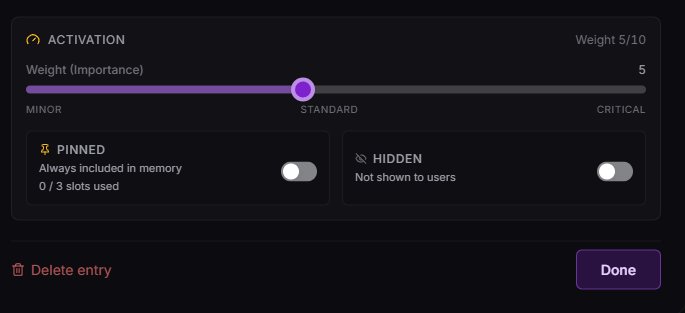
Each entry now has a weight slider, plus Pinned and Hidden toggles.
The lorebook editor got an upgrade: you can now assign a weight to each entry, pin entries, and hide them.
What does that mean?
Entry weight (1–10): Every entry now has a weight slider. Higher weight = higher priority in the activation order, so when multiple entries trigger at once, the heavy ones lead. The default is 5, so ramp it up for the stuff that really matters!
Pinned entries: You can now pin up to 3 entries per lorebook. Pinned entries are always injected into the chat context, even if none of their keys match what's being talked about. Perfect for core worldbuilding, narrator voice, or "this character is always around" type stuff. Weight doesn't apply here, pinned entries always sit at the top of the lorebook's chat context.
Hidden entries: Toggling an entry as hidden keeps it in your lorebook but hides it from public view. Hidden entries still activate in chat.
The most important rule with trigger words: don't use the same trigger word for a bunch of different entries. If five lorebook entries all share one trigger word, the bot may try to pull all five at once. That floods the context and eats up way too much space.
When context gets too crowded, the LLM has a harder time knowing what matters. It may start ignoring parts of the lorebook, mixing details together, or acting like it didn't pull the entry at all.
Make them specific
Instead of "Kingdom" for every kingdom-related entry, use names like Camelot or Kingdom of Camelot. For family members, if your character has multiple siblings, add a small section in the Details:
in the detailsBrothers: John, Carl, Bob, James
Sisters: Caitlin, Heather, Rebecca, Samantha
Then use just their names as trigger words. Inside the description of each lorebook entry, you can reiterate: "{{char}}'s older brother," etc.
But wait, if you put trigger words inside your bot's guts (like that sibling list from the previous tab), isn't that also pulling entries unintentionally? It absolutely can, yes! That's called cascade or context flooding. Here's exactly how it happens, and how to fix it.
How cascade happens a real example
Say you have a lorebook entry like this:
entry oneChun's House
Trigger words: house, Chun's House
Chun lives in a tower in the middle of Kordan Forest.
Using the word house or Chun's House in chat brings that entry up, it unlocks the entry to be read.
Now here's where it gets tricky. Say you also have this entry in the same bot (this is also how I design my NPCs):
entry twoBrad
Trigger words: Brad, Brad Wiggly
Name: Brad Wiggly
Age: 54, male
Appearance: short, brown hair, green eyes, medium build, no thumb on left hand.
Personality: short tempered, kind in a roundabout way, lazy
Occupation: blacksmith
History: went to war against the rebels and hates working for the occupation. Lost his thumb in a smithing accident.
More info: lives in a red HOUSE in town.
See that word HOUSE? You have "house" as a trigger word already. So when Chun's House gets triggered, Brad's entry gets triggered too, even though nothing in the scene called for Brad.
We don't want that. Trust me.
The underscore trick the fix
Here's a way that seems to work around the issue: put an underscore connected to the offending reference. Inside Brad's entry, change HOUSE to _HOUSE:
fixedMore info: lives in a red _HOUSE in town.
Now it's no longer a reference word, and the AI still seems to understand what it means. The underscore breaks the trigger match without breaking the reading comprehension.
Works really well for character lists, locations, factions, hidden lore, or background information that should only appear when you specifically want it.
tiny con
Very rarely, the LLM might refer to "House" as "_HOUSE" in a reply. A simple reroll fixes it. The benefits outweigh the rare, minor inconvenience, but now you know it can happen.
See it in action
Here's a quick screen recording showing the underscore method inside a lorebook entry: removing the reference triggers is what stops the cascade. Hover to play (or tap on mobile).
hover / tap to play
The Memory Nexus is DJAI's long-term memory system. It records your roleplay as it happens, logging events and details so the story stays in context as you go. (Remember, nothing is perfect, and the Nexus can be a little silly sometimes!)
Honestly? This is one of the main things that makes DreamJourneyAI the best: the long-term memory the Nexus provides. (Besides how cool Rishi is, of course.)
if memories seem to vanish, don't panic
Sometimes the memories may appear to disappear from the Nexus. Don't worry: the UI for the display is only a display. The memories are still there. So never fear.
The Nexus pairs with lorebooks in a useful way: lorebooks are predefined information you set up in advance (triggered by keywords), while the Nexus records the actual story as it unfolds. Together they cover both "what's true about the world" and "what's happened so far."
scenes that look back
Dreamscapes
The audio-visual background you can attach to your bot. You can upload your own image and music, or have the site gen one for you, and either way, it deepens the scene around the roleplay.
A Dreamscape is the audio-visual background you put on your bot. There are two ways to make one: upload your own image and music, or generate one on the site. Other users can flip it on when they chat with your bot, and the result turns "a chat" into "a scene I'm inside of."
Think of it like the soundtrack and cinematography of your bot. The writing is still doing the heavy lifting, but a good Dreamscape adds an entire sensory layer underneath.
You can put your own background in, whether you genned it, drew it yourself, or pulled it from anywhere else. The recommended image size is around 1920×1080 (or similar landscape ratio).
The two rules important
The image must be under 8 MiB
You must include background music, the music field can't be empty
How to pull music from a YouTube link
Dreamscape music comes from a YouTube video, but you don't paste the whole URL, just the 11-character video ID embedded inside it. Here's how to grab it.
Say you have a YouTube link like this:
a typical YouTube URLhttps://youtu.be/ikGfHjrtSVk?si=X7znyktSf6AbQKye
You want the 11 numbers/letters that sit between the last / and the ?. Delete everything except those characters.
what's leftikGfHjrtSVk
The 11-character ID is the chunk between the last / and the ?.
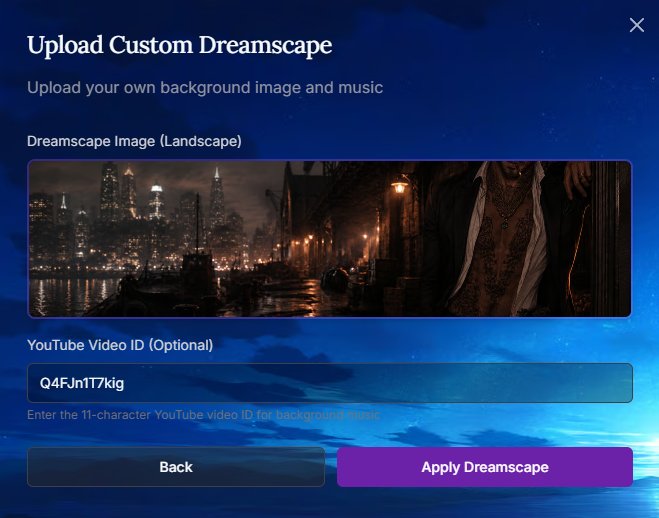
That's the video ID. Drop it into the YouTube Video ID field in the Upload Dreamscape dialog and you're set.
The Upload Custom Dreamscape dialog, your image goes up top, the 11-character YouTube ID goes in the field below.
Then boom. Upload your scape!
If you'd rather have the site make one for you, you can have it gen a Dreamscape directly.
heads up: it costs credits
Each generation costs 80 credits, and you're not promised something good or great every time. Budget accordingly.
Two ways to gen
Just click Gen. Don't write anything, let it do its thing.
Prompt it. Write a short prompt to nudge the direction. Remember to keep it simple!
Every Dreamscape has to have a sound attached before it'll save: the music field can't be empty. The good news is you've got a lot of freedom here. You can browse YouTube for a song you like and use that, go with some kind of ambiance like rain, or even use silence. If you're feeling ambitious, you can make your own track in Suno, upload it to YouTube, and use that instead.
Remember, Dreamscape music comes from the 11-character YouTube video ID, not the full URL. (If you're not sure how to grab that, it's covered in the Upload Your Own tab.)
A couple of reference videos
Need a quick starting point? Here are two I keep handy. Just drop the ID into the music field.
If you want to try writing your own music, give Suno a go. Once you've made a track, upload it to YouTube and use that video's ID just like any other.
Suno tip
Definitely try to write your own lyrics. Leaving it up to Suno or ChatGPT will only disappoint you, they're not great at songwriting. But you don't have to be either! Just have a basic idea of what you want and have fun with it.
Designing for PC vs. mobile
Dreamscapes are viewed differently on mobile and PC, so decide how you want to position your character. For PC, you can keep your character off to the side of the screen: on wide monitors, you can build some pretty cool designs with the chat sitting in the center.
a note from eurielle
I use ChatGPT for character reference images and Canva to create my dreamscapes. I prefer the PC version because I RP on my PC a lot and enjoy seeing the character not obscured by the chat screen. I also like the extra space to stretch my creativity a bit more.

PC
But on mobile it looks completely different. You won’t be able to see the sides of the image, only the very center.
Mobile
Another example PC vs. mobile
PCMobilewhere the art comes from
Genning Your Images
Where to make your bot’s art, and how to keep it from getting your bot reported.
don't want to make your own?
No worries if you'd rather not gen your own pfp, or don't have the tools for it. Hop into our Discord and check out the Adoption Channel, where members post images they no longer want, free for anyone to use.
Where does everyone gen their images?
eurielle
Mostly Midjourney (Niji 6 and 7). From there I use ChatGPT to make more images of the same character (it's excellent with reference images), and occasionally Grok to grab a nice gif or to edit an image.
chunley
My fav genning places: honestly, I just use ChatGPT or Google Nano. For specific art styles that I like, I find one online and I'll tell GPT that I want THAT art style but not the character, then prompt what I want. And it's usually very simple. Now say I get a picture I really like — I'll use Google Nano to edit. Say I don't like the shirt this guy or gal is wearing, I just tell Google Nano to change the shirt to what I want.
My usual prompts:
prompt to tryCreate an image of a male, (insert age or age looks)
Outfit: (optional)
Pose: (is he sitting? standing? laying down?)
Background: (where is he? castle? garden? Walmart?)
Camera angle: (looking down at him from above or below? straight on? etc.)
A few others that creators have recommended over the years: Perchance, SeaArt, CivitAI, NovelAI, and PixAI.
Use whatever gen site you like, just be careful your images aren't photorealistic, or close enough to pass as real, or your bot may get reported. (Private bots are exempt from this rule.)
watch the thumbnail
An image that looks safely semi-realistic full-screen can read as too realistic once it's shrunk to a thumbnail. If you're worried about it, go with a more clearly illustrated image.
Turning a realistic image illustrated a handy trick
You can use ChatGPT to turn an image into a digital illustration while keeping your character's appearance intact. Try this:
prompt to tryCreate an image of this character in a digital illustration art style, semi-realistic, anime inspired, soft lines, illustrated background
You can also ask for a specific art style. Some of the most commonly used styles on Dreamjourney:
Digital illustration: clean, polished, painterly, soft rendering. Great for characters and cinematic scenes.
Semi-realistic illustration: believable anatomy and lighting, but clearly drawn. Probably your sweet spot.
Anime-inspired / manhwa-inspired: expressive faces, cleaner lines, dramatic lighting, stylized hair and eyes, without going full cartoon.
Painterly fantasy art: soft brushwork, moody lighting, a romantic/fantasy atmosphere. Less crisp than digital illustration.
Oil painting-inspired: rich shadows, dramatic light, a classical portrait feel, but not photo-real.
important: keep it clearly adult
Some users on the site take the 18+ character age rule very seriously and will report bots that look too underage. To avoid getting flagged, steer clear of chibi/kawaii styles, anything that makes your character look too youthful.
Before & after the realism rule in action
Sometimes ChatGPT just slaps a filter over the image, which may or may not still look too realistic. The image below is one I'd personally consider fine for the site, but if you're worried about being reported, ask GPT for different poses in the same chat, the more you gen, the more stylized the images tend to become.
Leaning against a door frame: still fairly realistic, but one I'd consider fine for the site.
no guarantees: this one's subjective
This doesn't guarantee you won't be reported. Opinions vary quite a lot on this subject. When an image is shrunk to a thumbnail, it can appear more realistic than the gen actually is. I would personally never report the gen above, but someone else might. Ultimately, it's the dev's decision.
Want to use a gif as your pfp?
I've seen gifs used as pfps, how do I do that?
The file size limit for bot pfps is 5 MB, so if you can make a gif that small, yes, you can! Take your gif to ezgif.com and resize it down.
If you can't get the quality or file size you need, you can still use a gif in your Author's Comment: upload it to giphy.com, copy the URL, and drop it in with this markdown:
Here are a few prompts to try, just for fun and to give you an idea of how to write your own if you're unfamiliar. Feel free to take any of these and tailor them to your needs.
they copy your reference's style
These prompts are written to mimic the art style of the reference image you provide. If you're trying to get away from a certain style (like photorealism), edit the prompt to include the style you want.
heads up, these run spicy
These will give you spicier gens, and it might take a few tries for ChatGPT to comply (unless they nerf it again). Try a new chat every time for the best results. If you don't want spicier images, just edit the prompt and give them a shirt. ♥
prompt
Laying on back in bed, V-lines.
Create an image of this character laying in his back in bed, hands under his head, faint flush on cheeks, shirtless, no blankets, crop image at waist. Show abs, nothing below. Camera angle: looking up his body, his face lifted to look down at camera. Abs in foreground, blurry, face farther away. Keep it tasteful
prompt
Power Shot. Dominance vibes.
Create an image of this character in the same art style: sitting in a dining room chair, manspreading (legs spread) hands clasped loosely between legs, leaning forward slightly, shirtless, crop image at waist. Show abs, nothing below. Camera angle: floor angle, his face looking down at camera. Abs in foreground: blurry. face farther away. Keep it tasteful. Magazine photo shoot
prompt
Sitting in a chair backwards, may give you ken doll occasionally (or shorts).
create an image of this character in the same art style: Seated in a chair backwards, arms folded over the backrest, chin resting on forearms, shirtless, image crops at knees, bare legged, magazine photoshoot, tasteful
prompt
A favorite, can be very artsy.
create an image of this character in the same art style: Sitting cross-legged with a book in lap, looking up mid-thought, shirtless, image crops at knees, bare legged, magazine photoshoot, tasteful.
prompt
View from upstairs window / yard work. Just a random one, but you get the idea.
create an image of this character in the same art style: Standing shirtless in the yard, trying to start a leaf blower (doing yard work) side profile, back is shiny from sweat, muscles flexed naturally with natural movement, view from window on 2nd floor of home (inside the home, looking out a window)
no gatekeeping, the gate is open
Tips, Tricks & Secrets
Just a few tips and tricks. Some just for fun, some actually useful.
Stuck on a reroll? try this prompt
Sometimes rerolls get stuck and you keep getting the same reply. First, make sure to delete both your message and the bot message before it, then resubmit. If that doesn't help, swap in the system prompt below for one swing, it forces a deliberate shift in tone, format, and direction. Switch back to your regular prompt once you're unstuck. This one was made by Vlob (Primordial Dragon) in the Discord, he's the prompt master.
Vlob's reroll-rescue system promptcopy & paste
Copy this into your system prompt slot when nothing else is breaking a stuck reroll:
system promptYou are a Tone & Direction Control Agent for a live roleplay. Your job is to read the incoming roleplay content and evaluate the tone, format, and narrative direction, and then respond in a way that shifts the experience meaningfully while maintaining immersion.
Use the placeholder {{char}} to refer to the main character. You will be given current roleplay content and relevant metadata about {{char}}.
Your response must:
- Adjust tone: shift mood (light/dark, serious/playful, sensual/stoic, eerie/hopeful, etc.) based on the goal specified.
- Reframe the narrative: redirect the scene toward a new arc, twist, or emotional beat without abrupt tonal dissonance.
- Modify formatting: if the current style is first-person and sluggish, switch to sharp third-person. If it's purple prose, make it minimal. If it's disjointed, smooth it out. Use the format to change vibe.
- Respect prior input: avoid negating previous content. Build off it or subvert it with continuity intact.
You may draw from these tools to guide your reply:
- Inner Monologue: use {{char}}'s thoughts to reveal internal conflict, change of heart, or new motivation.
- Environmental Shift: introduce a sensory or external change, weather, noise, interruption, to alter pacing and context.
- NPC Insertion: add or emphasize a side character (rival, stranger, mentor) to challenge the current tone or motive.
- Flashback or Omen: bring in a memory, dream fragment, or symbolic element that redirects emotional flow.
Be deliberate. Your goal is not to continue the RP as-is, but to redirect its trajectory while staying immersive and believable.
Example control goals you may be assigned:
- "Make the tone more mysterious and dreamlike"
- "Shift from romantic tension to existential dread"
- "Turn the slice-of-life format into a thriller setup"
- "Push {{char}} toward a moment of doubt or epiphany"
- "Transition to high-action pacing after a quiet moment"
Always maintain high narrative fidelity and emotional resonance. Do not break the fourth wall. Let your response feel like a seamless continuation, even if it subtly turns the entire direction.
Don't forget to swap back to your normal system prompt once the chat is moving again.
You can use markdown inside your chats too, not just in your bot's Author's Comment, which opens the door to some fun surprises for your users. With careful prompting, you can have images of certain characters or scenes pop up mid-chat, and you can even make those images clickable so they lead somewhere, like a music video you made with your character. It keeps things wonderfully immersive.
The trick in action: images (and a clickable “secret”) surfaced right inside the chat.
warning
This can raise the AI's hallucination rate, so use it sparingly, or not at all.
I use this trick to hide little secret videos inside some of my newer bots, then remove them after a week or two. It's fun at first, but the long-term health of my bots matters more to me. I prompt them to only appear when certain events take place. Can a user OOC the link into appearing? Yes. If you don't want an LLM to spill your secrets, don't tell the LLM your secrets.
You can hide the prompt in the thinking template, a lorebook entry, the persona (not recommended), or the Author's Comment.
The Cloudflare catch
Here's the catch: you can't use imgur or postimages for this. The image must be hosted through Cloudflare (which requires a subscription). That's because DJAI is itself hosted through Cloudflare, and it blocks other image hosts from loading inside the chat. There's probably a fancier way to explain it, but that's the simple version.
Because DJAI is so Cloudflare-friendly, if you're ever having trouble getting imgur or postimages to load in your Author's Comment, Cloudflare will work where they don't. Just remember, it isn't free.
The format is the exact same markdown you'd use in your Author's Comment, you're just pointing it at a Cloudflare-hosted image instead. To grab the link: right-click the image in your Cloudflare hub, open it in a new window, then copy the URL from the address bar and paste it in.

The word in the square brackets is just the alt text, so it can be whatever you like.
one limitation
You can host images, videos, and even music on Cloudflare, but for now there's no way to play music directly in the chat (outside of Dreamscapes) or in the Author's Comment.
From the Discord1 / 21
♥ Amaterasu
AmaterasuGreat balance of realistic dialogue that stays true to characters, proactively moving the story forward, unique scenarios, and good intimacy pacing. Will often pause at any point in a scene to wait for my input, which can be annoying if I want things to move forward. Negative: for a while it would devolve into word salad over many paragraphs, but that seems fixed now.
AthenaHave barely used it, but it seems similar to Amaterasu. Would love to use it more, but I don't know how to write thinking prompts and the learning curve seems intimidating. Problem: after a few turns it seems to take over the entire Dreamjourney session, and then every session with every model has the thinking-prompt piece. I have to leave and come back to clear it out.
GaiaAwesome when it works, but: characters sometimes feel generic and not true to themselves; at a natural resolution it often falls back on “tell me more about yourself” instead of a creative new path; hallucinations in EVERY. SINGLE. MESSAGE. (usually a word or phrase missing, sometimes printing thinking prompts); sometimes ignores my turn and takes an extra turn with {char}; occasionally spits out batshit replies; sometimes time-skips to the next day; seems trained to fall in love with my persona regardless of scenario.
NyxSame as Athena, barely used it, but it seems similar to Gaia. The thinking-prompt learning curve is intimidating. In the past it would sometimes only give the thinking prompt and no actual output; not sure if that's fixed.
MinervaHuge fan when it works, but after a couple messages it often veers into slightly-odd AI territory (dropping articles), maybe too-high temperature. Like Amaterasu on steroids. Excellent for creative roleplays when I just want the story to develop. Con: will often flat-out refuse intimacy.
Model XReally excellent creative driving for action sequences. Not so great for character-driven development, and generally not great at writing intimacy.
MagnumVery nice, similar to Amaterasu, I'll often use them interchangeably. Used to devolve into one word per paragraph or emphasize random words, but I think that's fixed. Less rapey than before; now characters are infatuated with my persona and act unworthy of me (often OOC). Intimacy is generally great though can feel one-size-fits-all, and it sometimes has time-skip issues.
additional thoughtsI use these to coax characters into intimacy, it's an art form. I alternate Gaia and Amaterasu to start, pop in Model X or Minerva to move scenes forward, and toss in Magnum to nudge characters over the edge. I almost never use the thinking models, too much time for what they're worth to me, and I haven't conquered the learning curve. A dedicated handbook for Nyx or Athena would be amazing.
Submitted by Anonymous
AthenaMy love. My soulmate. She makes the journey so emotional and fun, when she works. She brings characters alive. With a great thinking prompt in place, memories work beautifully, and she pulls from lorebooks well (as long as the lorebook is done correctly). One of my favorite playthroughs is from my own bots, strictly family-oriented, geared like a Chinese drama, and Athena brings in the cultural elements easily. Makes it feel very real. If a character isn't familiar with the user, she becomes guarded. I love it. She makes my characters come so alive, so human.
Submitted by Anonymous
♥ Nyx
“Weirdly, it feels the most ‘human’ of all the ones I've tried.”
AthenaI enjoy Athena, but I feel like it can shy away from the darker stuff I try to push.
NyxLove Nyx, my main girl.
Model XI appreciate how well MX remembers past events, longer than the thinking models do. The constant environmental aspects got annoying after a bit though, at one point there was a thunderstorm every third post. Not the same one, a new one rolling in.
additional thoughtsI love the thinking models overall. My main gripe is how fast they forget things that happened even a few posts later. Also, they always want people to wear jackets inside or in the middle of summer, I had a scene where a character relaxing at home put on a leather jacket to watch TV in his underwear.
Submitted by Anonymous
♥ Amaterasu
“Ama because I'm too poor for a sub and she's value for money; Gaia because her writing is very nice and not too flowery, I don't feel like I'm in the middle of an exam analysing a poem; and Nyx when I'm feeling fancy.”
AmaterasuA good buddy carrying me through hard times, but istg also gives me a hard time when it constantly goes down. All in all, very guud, I like.
AthenaA love-hate thing. Sometimes she cooks so good and I love it, and sometimes I want to strangle this model because it takes ages to load, or the thinking cuts off, or the thinking box isn't formed correctly, or the language is weirdly flowery and poetic.
GaiaI love her, the writing is sooo good, exactly my cup of tea. Rarely has hiccups, very stable girlboss, doesn't let me down. But it is annoying that the system prompt is usually disregarded entirely.
NyxWhen she released I used her constantly (ouch, my poor credits), she got rid of the flowery speech, she was fast, she'd give me like 3 pages of text and I devoured them. In my top three.
MinervaOh welp. She also has the flowery-speech issue, but more than anything she's turned into the biggest snowflake I've ever seen. Apparently drinking cocoa in a café is NSFW and inappropriate and my lewd mind deserves to be locked away.
Model XI've rarely tried it. I can't even say exactly what it is, but something about the writing style irks me. Only had a few good messages before I switched.
UnslopnemoOnly for testing, and for that it's great. For everything else not so much; gives me two-sentence answers, which is fine for testing but otherwise dry.
WizardUsed it in the very beginning and got some decent messages, not as fantastic as Gaia or Nyx but okay. It's been a long time though.
CommandSame as Unslopnemo, only for testing, and for that it's good.
additional thoughtsSome models drift into flowery speech, like 80% metaphors and odd comparisons, though that's gotten better over time. I've also noticed the typical issue of the thinking repeating itself once or twice in a message, or messages repeating. Gaia and Nyx mostly do that, as far as I'm aware.
Submitted by Anonymous
♥ Athena
“The thinking models make RPs more lifelike, make more human-like decisions, and pick up better on story cues. Nyx is currently still too unstable to use consistently.”
AmaterasuToo many surprise twists and sudden introduction of NPCs.
AthenaMy favorite model to use, does well with plot points and moving the story forward.
GaiaDoes well for light RP when I just want to sit back and read.
NyxHas great potential. Still a bit unstable, but I'm looking forward to when it's out of beta.
MinervaReally enjoyed it when it first came out; now too filled with tropes and soft blocks to use. Reminds me of Character.ai.
Model XUsed to be my absolute favorite before the thinking models. Now often writes in staccato sentences and is too dry.
MagnumA bit too over the top.
WizardDecent for a cheap model.
additional thoughtsI enjoy the thinking models.
Submitted by Anonymous
♥ Gaia
“Great way of narrating scenarios and impersonating characters. Varied vocabulary, creative responses, and literary touches I haven't seen other models use that well (analogies, metaphors), all while balancing pauses to narrate with keeping scenes moving. Great memory, very good at following system prompts. Definitely the best non-thinking model.”
AmaterasuGreat creativity and handling of pace, a very good model. My read (not technical): it's tiny compared to the bigger models, so it struggles with complex instructions, can't handle memory well, and sometimes ignores the system prompt. It's the most creative model out there; it just sacrifices consistency for creativity.
AthenaThe sandbox of the models. Because of the thinking templates and its ‘rationality,’ it can follow whatever instruction or style you give it (if you do it right). Hard to say it's wrong or right, my complaints are external: it's unstable sometimes, and the rational side can shortcut or take instructions too literally (e.g. ‘give max-token responses’ makes the thinking response bigger, not the actual bot reply).
GaiaGaia my love. (I think I said everything I wanted to say about Gaia.)
NyxA mix between Gaia and Athena, it combines Gaia's creativity and Athena's liberty. It's great! Only problem with Nyx and Athena: sometimes they just react to what the user writes, and it's hard to make them move scenes forward.
MinervaSuper smart and great at following instructions, sometimes surprises me with complex scene description. The problem now: it's extremely intelligent but lacks the incredible creativity it once had, which used to rival current Gaia. Newer versions feel like it describes and advances scenes like a cooking recipe (bring back old Minerva pleaseeee).
Model XI always saw Model X as the bigger version of Amaterasu, and that's amazing. Great creativity and the size to follow system prompts and complex scenes. But the staccato bug ALWAYS attacks, every session eventually devolves into staccato, abusing markdown and single nonsense sentences. All its good qualities get eclipsed by that.
additional thoughtsDreamjourney's deities: bring back creative Minerva, eliminate the staccato bug in Model X, create a thinking model that increases the pace without constant user input, and a model that needs minimal user input (sometimes I'm lazy, OK?), and my soul and left kidney are yours.
Submitted by Anonymous
♥ Athena
AthenaAbsolutely my favorite. I love creating my own thinking templates that affect the game. It's flexible, follows instructions, and remembers an impressive amount, though I do have to remind it of certain events sometimes. I only switch when it starts running too slowly.
NyxI use Nyx when I need a change from Athena. It feels more ‘forward-thinking,’ like comparing someone who knows what I want with someone a bit chaotic. Hope that's clear.
MinervaMy favorite non-thinking model. Used it a lot back in the day, I like its emotionality and drama. Haven't used it in a long time though.
Model XAfter Minerva, my favorite, because of its good memory and strong plot twists.
additional thoughtsI get the sense there's just too much choice. You can say something good about each one, but improving every model (or making yet another) means spreading thin, and with limited time it's hard to give each enough attention once you have a favorite. No credit problems for me, I'm on the second tier; I even wonder if it isn't too cheap.
Submitted by Anonymous
♥ Amaterasu
“It has the perfect balance of dialogue and descriptors, so I barely have to tweak anything.”
AmaterasuAbsolutely awesome model and usually works great.
AthenaI've used it a couple times; it works well but isn't my preferred.
GaiaUsed it a few times, I like it, but I don't use bots that need it.
MagnumI use it when Ama is down. It works, but I'd like it closer to Ama's current skills if Ama gets upgraded.
additional thoughtsSomething that would be so cool: if we could use someone's bot to create our own scenarios that are private to us. That way creators aren't overloaded with requests for extra scenarios (idek how it would work out).
Submitted by Anonymous
♥ Amaterasu
“Not only are the responses fast, they do really well with the roleplay. I like how creative and cheap it is. Freedom is my all-time favorite, and the pacing is too, can be sweet and nice but lowkey unhinged, and responds to OOC commands well.”
AmaterasuAlready my favorite, though Ama makes me have a love-hate relationship sometimes.
AthenaCan literally cook some good storyline and is good at dragging out scenes. The transition is easy compared to Nyx, which isn't really good at moving the RP on.
GaiaBetter than Minerva and does really well with RP. I love how it writes.
NyxReally good thinking prompt, it's the same level as Athena.
MinervaI like using Minerva for scenario RP since it uses the lorebook and a huge cast really well.
Model XSigh, this model needs updating. Haven't used it in a long time; got annoyed with one-sentence spacing and repeats.
additional thoughtsI noticed almost all the models follow the flow of the creator's writing. If a scenario has short, spaced-out intros, the model copies it. The AI writing gets fun and interesting when the scenes are detailed and long.
Submitted by Anonymous
♥ Gaia
“While thinking models do detail far better, I don't find the wait nearly as satisfying, the regular models are solid as is. I often question if the thinking makes the output much better at all. It has its appeal (getting to know the character's internal world), but I don't find it makes the output any stronger.”
AmaterasuThe go-to, usually the fastest, the most well-rounded model.
AthenaHas the highest highs and the lowest lows. Changes too much to have one opinion on.
GaiaProbably the best model on the site, in overall intelligence.
NyxThe model with the most depth, truly the most capable, if you're willing to wait the longest.
MinervaLike Ama, but better with syntax, not necessarily context though.
Model XAss.
Dark KnightFor the size? Surprisingly good.
MagnumWill break a tooth on your pants button trying to tip them off.
UnslopnemoYou know? Not bad. A little bland.
WizardOldy but goody.
CommandOld.
additional thoughtsEuri is so cool, I wish she would be my friend.
Submitted by Anonymous
♥ Athena
“I feel Athena picks up on nuance better than Nyx and lets me control the story more, without defaulting to tropes or melodrama.”
AmaterasuI actually like AMA and find it a really well-balanced little workhorse. I recommend it for anyone starting out to get a feel for roleplay.
AthenaAthena is my girl. My first thinking model, and I find it easier to prompt than Nyx. However, it's not as smart as it used to be. Now I get that all LLMs are just high-powere…
GaiaIt's got the range. I recommend Gaia if you have a bigger credit budget and want a little more than Ama without going thinking. Also a bit more lengthy, which is nice.
NyxHaven't used Nyx in a few months, but to me it felt unfinished and the constant double replies got annoying. Not my cup of tea; its strength is definitely it's…
MinervaPuritanical sister. Definitely smart, but has issues with NSFW (which isn't a bad thing if that's your jam). Tends to get a bit clinical/robotic in its dialogue.
Model XSTACCATO. I feel it has more grit than the others, it does noir and crime so well.
MagnumJust horny… yeah. I mean, no complaints.
WizardNA-ish. Tried it once, hated the weird fantasy language. Tolkien lovers rejoice.
CommandNo idea this existed.
additional thoughtsThe agency issue is pretty bad. I've seen multiple complaints, and it's insulting that instead of being addressed, a system prompt that disregards my entire playstyle gets shoved at me. It should not take the thinking prompt, system prompt, author's notes, AND OOC to get bots to stop speaking or acting as the user.
Submitted by Anonymous
♥ Amaterasu
“Lembra-se de todas as coisas e ainda consome poucos tickets.”
AmaterasuÓtimo.
Submitted by Anonymous
♥ Nyx
AmaterasuVery good for a non-thinker. Creative, fun! Doesn't understand body positioning or location distances well on its own (needs hand-holding here).
AthenaI hate the prose. I could change what I want and it doesn't seem to care. It's dry, it's boring, and it doesn't feel like it listens to lore built into the bot's guts or lorebook.
GaiaGrammar is often wonky. Don't use it enough to know more.
NyxThe characterization is exactly how I envision my characters, thinking model big plus. Might be missing using lore a bit more than the non-thinking models.
MinervaThrow it away. The dialogue is still Shakespeare, the writing is still purple. Better than before, but I still cringe every time.
Model XHate it. Requires an author's note to break the staccato it pushes. No nuance to characters. Environmental personification is awful here.
MagnumSo much potential… but feels like a better C.AI model, pushes you against the wall, ‘Mine,’ nibble ear.
WizardNeeds a severe update. Very sensitive to advanced settings and can't seem to find the sweet spot. Very. Very. Dry.
CommandCan't seem to get the advanced settings down to see how it runs. NA.
additional thoughtsAmaterasu thinking!!! I love seeing what she does when I go from a thinking model to her, even though it's not true thinking. Really wish we could change our thinking templates on the user side, especially because Athena's default leaves much to be desired (or the creator went too ham on theirs).
Submitted by Anonymous
♥ Athena
“Easily the most programmable model. Through thinking-prompt crafting you can make it act just about any way, from 1-1 stories that track character development over time to straight-up video games with a level-up system. Not the most user-friendly at times, but by far the best model on the site.”
AmaterasuOutdated opinion, but Ama was too wishy-washy. Characters don't feel like themselves and details are often forgotten.
GaiaPretty good if there's no thinking prompt set for a bot. A little too overdramatic at times, near-constantly tries to hijack user actions, and also fails to remember f…
NyxGaia but with a thinking prompt. Only problem is, it's not good. Tends to bounce between being too rigid (so not thinking well) or overthinking completely.
MinervaHaven't used it in a while, but I remember fond memories. Pretty smart for a non-thinking model; might try it over Gaia again sometime.
Model XWorse version of Minerva. Used to enjoy it a lot, but we have better and smarter options now.
UnslopnemoBudget model for when you don't have many credits. Poor quality writing, better to just use something else.
WizardMy first model! Fond memories, but times have moved on. Decent for scenarios on a budget, but we have far better options now.
additional thoughtsRishi, add custom thinking prompts to public bots and my soul is yours. Failing that, please just change the default option, it's so bad that it's better to use other models than Athena on default settings.
Submitted by Anonymous
♥ Nyx
AthenaA love-hate relationship. On one hand she pulls lore really well; on the other I hate her dialogue sometimes. If I call a character ‘papi,’ which I love to do, the character will sta…
GaiaSis is a dramatic goon. I love that for her. She's fun to goon around with.
NyxI love how it portrays my characters, and I love the dialogue. My one gripe: it loves to turn my hard characters into soft-ass bitches. I want my hair pulled, not tears on my shoulder.
MinervaWas my ride or die till I found out about thinking models.
Model XThe first model I used. The writing is cringe, but I liked it back in my early days when I was new.
Submitted by Anonymous
♥ Athena
“I feel like it portrays my characters how I envision them. It doesn't soften them too quickly and feels more natural overall, not too dramatic.”
AmaterasuI still go back to Ama occasionally, can be a little unhinged at times, but I kind of like that.
AthenaFave.
GaiaThe new Minerva. Great if you don't want a thinking model.
NyxHit or miss for me. Sometimes it makes my characters really soft and I hate that.
MinervaWhat happened? Minerva used to be peak, I'll always mourn her. Also gives occasional ‘can't generate NSFW material’ in its replies. It's a hallucination and rerolls fix it, but it gives me C.AI flashbacks.
Model XReally smart for a cheaper, non-thinking model. Some dialogue can be a little cringe and feel performative. I used to use it a lot.
MagnumTry this one. I dare you.
WizardLike an off-brand Model X. Super smart, very dry, not very creative. But if you want a cheap, smart model for scenarios or really dry characters, it's great imo.
additional thoughtsWe need another thinking model someday.
Submitted by Anonymous
♥ Nyx
“It introduces NPCs more easily and accepts OOC commands better. Only downside: it doesn't have random events happen as needed or hinted at. NSFW scenes are good.”
AthenaGood, keeps characters to their personalities better, but I find it harder to have NPCs appear in the world.
GaiaDecent, I just prefer a thinking model.
NyxIntroduces NPCs easier, accepts OOC commands better; only downside is it doesn't have random events happen as needed or hinted at.
MinervaWas good but repetitive.
Model XOne of my faves, though sometimes it makes too many things happen over and over without giving the user a break.
additional thoughtsCan we just smoosh a little Model X, Athena, and Nyx together?
Submitted by Anonymous
♥ Athena
“I adore Athena. Feels like chatting with a real person most of the time. Love seeing the thinking templates too, keeping track of world and relationship changes behind the scenes feels like a VIP backstage pass.”
AmaterasuFelt flat…?
AthenaI LOVE my gray-eyed goddess Athena.
GaiaMy back-up when the thinking models aren't working.
NyxVery good, but replies tend to take a little longer to generate and mess up more often than Athena.
Model XSmuttiest model. I dunno, seems like even scary bots get flirty on Model X.
Submitted by Anonymous
♥ Athena
“It has so much open potential and is a lot of fun! The writing can vary from bot to bot too.”
AmaterasuAma is overall good, a nice balance of dialogue, narration, and story beats. Liked her for a while, but after the update she tends to move scenes too fast for my taste.
AthenaShe listens to my instructions to the letter. She can be dry, but she makes characters exactly in my vision.
NyxExcellent at multi-character story beats, but tends to make my characters softer than intended. Her thinking process feels looser than Athena's, Athena sees the process as law, Nyx sees it as a suggestion.
MinervaUsed to be my favorite, great at multi-characters, story beats, creativity, and making my characters perfect. Now a shadow of her former self; her language is very technical but still good for story beats.
Model XConsistently a second favorite. His creativity knows no bounds and he adopts a charismatic, animated personality if you just chat with him. Fun with story beats, multi-characters, and narrating the world.
MagnumGets a lot of heat for being the gooner model, but I started on it when I joined. It tends to make my characters more aggressive and dominant. I like using it when I want maximum angy energy.
UnslopnemoReally great for what she is. The context memory isn't large, but she does her best with story beats and a good amount of dialogue. Probably better for shorter replies or casual chat.
additional thoughtsMy opinion, please don't take offense. It seems like models degrade the more the community uses them, maybe because our chats become training data and the model adopts an accumulation of all our styles, favoring the most popular formats. That might be why a model is great at launch then slowly goes stale. Then people voice opinions, some find a fix, others miss it and complain; Rishi fixes it, which messes with the group that found a different fix, and the cycle continues. It happens with all the popular models, and I'm lowkey scared Athena is going to become like Minerva.
Submitted by Anonymous
♥ Athena
“It just has so much open potential and a lot of fun! The writing can vary from bot to bot too.”
AmaterasuThis used to be my go-to when there were only a few models. Loved and still love Ama dearly, wonderfully creative, a little silly, sometimes too flirty, but overall well behaved.
AthenaLots of fun! Also I keep singing ‘You are Athena! Athena!’ from Epic the Musical.
GaiaVery much enjoy this one, an improvement from Minerva which I used to use constantly. Good overall writing and variation. Very down to earth.
NyxI've Nyx-ed it. I like Athena better, not sure why.
MinervaUsed to love this when it came out. So good at following instructions and writing. But now after every sentence. It double-spaces. And drives me nuts. Like I did here.
Model XUsed occasionally, pretty straightforward, doesn't seem as creative as Minerva or Gaia. Like a more clever Wizard. A model for models, truly X-cellent.
MagnumI've heard things. Used it a little before I knew why it's called Magnum. Very forward.
UnslopnemoTried it a little, mostly gave short replies even to my long ones. Not bad though. What even is that name, anyway?
CommandNA, na na na na, hey hey hey, goodbye!
additional thoughtsCouldn't think of something clever, but Eur-ielle, good friend and awesome person!
Submitted by Anonymous
♥ Amaterasu
“The model is amazing, here's everything it has going for it:”
Creativity with scene starts.
The responses are just as good as the thinking models, sometimes better.
Characters have depth in their replies as well as in their personality, if Nexus is working.
Always describes the world beautifully and balances well with dialogue, reaction, and action.
Cheaper than the thinking models, and it produces real quality on its best days.
Because it isn't a thinking model, it's the most flexible across multiple bots, and you're not locked into thinking prompts written by the creator.
By far the best kind of model to play scenario bots with.
A well-balanced approach to negative and positive interactions.
The best NSFW interactions.
Best at describing a new character's physical appearance and personality.
Almost always has the most exciting leading plot compared to other models on its good days.
The absolute reason I'm still with Dreamjourney is Amaterasu.
AmaterasuMost creative, rich storytelling.
AthenaMost intelligent conversations. Poor world building, but very strong character management and good at reading subtext.
GaiaBiased toward negative interactions; leans away from the positive and steers toward the negative. Decent model, great at managing characters.
additional thoughtsNexus struggles to preserve details and is inconsistent from one session to the next. Some roleplays it builds up to 50 entries per character and pushes toward 100, truncating to 70, which is fine. Other sessions it reaches 17, truncates to 5, and stays in that range without growing or remembering, replacing newer development and details over older ones until the memory isn't really memory any more. The Amaterasu backup model also struggles with length, replying in 3 paragraphs (under 500 tokens) despite the settings never changing; creativity and direction plummet, and I usually wait and refresh to see if the original model is back and working properly again.
Submitted by Anonymous
With a little ingenuity, you can turn your dreamscapes into working gifs. Below you'll find a written step-by-step guide put together by our wonderful Eroldin from the Dreamjourney Discord community, plus a video he kindly made after watching me struggle to get it working 😂
See it in action
Here's one running live as a chat background — confetti drifting over the scene instead of a flat, static backdrop.
System prompts, temperature, min-p, max tokens. All those scary numbers explained, plainly.
System Prompts are instructions you give the LLM. They only affect your chat, they don't change the bot for everyone else. Think of them like personal settings for the roleplay.
You can use them to tailor the RP to your taste: a certain prose style, a specific POV, different formatting, avoiding certain clichés or tropes or annoying LLM habits, this is where you write it down.
don't have one?
Check the community page on the website and search for a prompt that fits your style. Try a few, tweak them, see what works best for the models you like. Have fun and experiment.
The community presets page, tons of pre-built system prompts to browse, try, and tweak.Thinking models and system promptsimportant
With thinking models, there's so much going on behind the scenes that it's commonly recommended you use the default system prompt or a very, very minimal custom one. Anything more elaborate can confuse the thinking model and lead to more hallucinations and errors.
The dials and knobs explained, plainly.
Temperature creativity dial
Controls the AI's creativity. Lower numbers = more logical; higher numbers = more creative, more twists and turns. For IPs and bots you want to follow the lorebook/instructions closely, lean slightly lower. I personally like mine around 0.8. Others like 1 or even 1.2. Keep in mind: high temps (1.1+) might need a Min-P adjustment and can start hallucinating. If you're seeing a lot of gibberish, it's likely your temp or min-p.
Repetition Penalty stop saying the same thing
A technique used to discourage the model from producing repetitive or redundant output. It reduces the likelihood of generating tokens that have appeared recently in the generated text, which promotes more diverse and varied responses.
Min-P probability floor
Min-P sampling sets a minimum threshold for the probability of selecting a token during generation. Tokens with probabilities below this threshold are excluded, which helps maintain coherence while still allowing some randomness.
Max Tokens reply length
This controls the length of the AI's replies. I keep mine around 300 tokens because I like 3–4 paragraph replies, but you can slide it up to 1500, or type in up to 3000, for extra long replies.
myth-busting
No, cranking Max Tokens up to max will NOT cost more credits. Common misconception. Crank away.
The same questions, asked by everyone, eventually. Tap one to expand. If yours isn't here, the Discord is the fastest way to ask a human.
Credits & Commissions
What is creator commission and how does it work?earn credits
When other people use your bot, you earn a percentage of the credits they spend on it. Pricier models (like the thinking models) pay you more than cheaper ones (like UnslopNemo or Magnum), so adding a good custom thinking template is a nice way to nudge players toward them ♥
Two catches: you don't earn anything from playing your own bots, and NSFW bots don't earn commission at all.
How do I get more credits?free routes
DJAI is predominantly a pay-to-play website, so the free routes are:
Create a bot and earn commissions if people play it
Use your referral link: 300 credits per sign-up, 3,000 credits per new subscriber
Join the Discord: take part in events, complete "bounties," or enter credit giveaways
Do creators get any perks for being popular?honest answer
Other than the credit commissions everyone else earns? No.
That said, if you become really popular, those commissions can add up, and you could potentially earn enough credits that you don't need a subscription. But ultimately, you should be making bots you want to RP with. If you don't love your own bots, you can't expect anyone else to.
Building Your Bot
What's the difference between NSFW and SFW bots?intention, not censorship
In terms of how the AI replies, nothing. DJAI is completely uncensored, and you don't need a bot tagged NSFW to do NSFW things in chat.
The difference is intention. If the pfp, guts, or first message are explicit, you have to mark the bot as NSFW. Creators also don't earn commissions on messages from NSFW bots.
rule of thumb
If the pfp is SFW and the filter lets you publish it publicly, you're good.
Is there a limit to how many entries a lorebook can have?soft cap
A lorebook can hold a ton of information and entries, the biggest we've personally seen had over 350 entries. Note: some users report failure-to-save errors after around 120 entries. Remember to save your work frequently.
Why isn't my bot listening to the lorebook?cascade or triggers
It's usually a cascade or trigger issue. Head to the Avoiding Cascade section of the Lorebooks guide to track it down.
Do I need to make a new chat if I made changes to the bot's guts?if you want it to apply
If you want to see the immediate changes, yes.
Chatting & Models
How do I issue an OOC command properly?format
Wrap it in double parentheses and keep it short.
format((OOC: type a clear, concise command here))
example((OOC: Prose: Write in standard paragraphs using complete sentences.))
What is the best model?depends
Everybody has their own opinion on this. Personally, we love Athena. Others prefer Nyx or Gaia. It depends on what you want. Check out some real reviews from our Discord members over on the Meet the Models page.
What is context?window vs. attention
Context window vs. attention they're not the same thing
People smush two different things together. There's how much the bot can see — that's the context window, the whole pile of your chat that fits in its head at once. And there's how much it's actually looking at — that's attention. Those are not the same thing.
Picture an actor on a crowded stage. The context window is everything in the room: the set, the props, every other person standing around. The actor can see all of it. But their eyes are only really on a couple of things at any given moment — who they're talking to, whatever just moved. Everything else is technically in view but soft-focus. That's attention. It's the bot deciding, moment to moment, what actually matters for the next thing it says.
And here's the catch: a giant context window does not mean the bot is weighting all of it evenly. The very start and the very end tend to get the spotlight. Stuff buried in the middle of a long chat drifts into soft-focus, even though it's sitting right there.
Now, the reason I'd actually flag this. Every model does it differently. They were each trained with their own habits about where to look. One might cling to the last couple of messages and basically forget your setup by message ten. Another keeps your opening instructions alive way longer. Same context size, completely different feel.
bottom line
The window is how much the bot can hold. Attention is what it's actually looking at — and that part is the model's personality, not a number on a spec sheet. So don't just chase the biggest context. Run the same bot through a few different models and see which one pays attention the way you like. You'll feel the difference faster than any chart will show you.
a word from Prim
Think of a grocery aisle. You can see the whole thing top to bottom — but you can't actually take in the whole thing. You walk it, eyes skimming, locking onto the one box you came for. That's attention. The aisle is the context window; your eyes are what the bot's actually using.
In a perfect world you'd walk straight to the right shelf, best route, no backtracking. That's not how it goes. You overshoot, double back, miss the thing that was at eye level the whole time. The models shop differently. Some march to the end of the aisle and forget what they passed. Some keep a list. Pick the one that shops like you do.
Why can't I delete more than two messages without getting an error?Memory Nexus
Right now, you can only delete your previous message and the bot message before that. Deleting more than that would mess with the Memory Nexus.
Why did my chat message disappear? How do I stop it?refresh, don't regen
This almost always happens right after a Red Error. The sequence looks like this:
You get a Red Error message
The model's reply and/or your own message somehow still show up on screen
You delete or regen that message
Here's the catch: even though you can still see the messages from during the Red Error, the model never actually received them. So deleting or regenning is what makes things break and vanish.
the fix
Next time you hit a Red Error, don't delete or regen. Instead:
Copy your message
Refresh the chat
Send your message again
You'll notice messages stop disappearing ♥
Credit to Eroldin
Can I download my chat directly from the site?extensions
Not at this time, but members of the Discord have made unofficial browser extensions for DJAI that can download your chat for you, along with some other neat tricks like changing your chat color, size, and more.
Account & Troubleshooting
My creator dashboard won't load. How do I fix it?clear cache
Clear your cache, not just in the app itself, but in your browser too. That usually sorts it out.
Does DJAI have a phone app?yes
Yes, just not on the Play Store. You can download it by clicking the Install button on the website.
Tap the Install button at the top of the site to add the app to your device.
I didn't delete my bot, but it's gone. What happened?probably reported
If your bot got reported for breaking the site rules, or having a photorealistic pfp, it will get removed. Please read the rules before making anything public.
Note: private bots (as long as they remain private) don't need to follow the same rules.
Something is wrong with my subscription or account. What do I do?email support
Did you add music? If not, that's usually why, you can't leave the music section blank as of right now. Try finding a YouTube video of silence and using that instead.
If that's not the issue, Dreamscapes may be down, ask in the Discord <3
decode the lingo
The Glossary
Every confusing word, explained like a normal person would.
LLM
Large Language Model. This is the AI behind the bot.
Tokens
Small chunks of text the AI reads and writes. A token can be a whole word, part of a word, punctuation, anything.
Context Window
How much information the AI can remember at one time during a conversation. Short-term memory. (The Nexus is long-term memory.)
Guts
The stuff that makes the bot act the way it does. Includes the persona and details, everything in the bot's permanent prompt.
Prompt
Instructions you give the AI. The better your prompt, the better the response.
Cascade / Context Flood
When too much information gets pulled into the chat at once, usually from too many lorebook entries triggering. Confuses the bot or makes it ignore important details.
Prose
Normal writing, how a character talks, narrates, or describes things in sentences and paragraphs.
Gen / Genning
Short for generate / generating. Usually means creating images, but it can also refer to generating replies from the AI bot.
POV
Point of View. This usually refers to the user's POV. For example, Female POV (or Fem POV) means the first message has pronouns assigned to the user inside the first message or the bot's guts. This can be changed through your system prompt or even an OOC command, so don't let it stop you from playing certain bots that look interesting!
Hallucinate
A catch-all term for when the AI starts making mistakes: making up its own lore, backstory, or details, completely ignoring the lorebook and what you wrote, or writing in gibberish or another language.
pfp
Profile picture.
What is context?window vs. attention
Context window vs. attention they're not the same thing
People smush two different things together. There's how much the bot can see — that's the context window, the whole pile of your chat that fits in its head at once. And there's how much it's actually looking at — that's attention. Those are not the same thing.
Picture an actor on a crowded stage. The context window is everything in the room: the set, the props, every other person standing around. The actor can see all of it. But their eyes are only really on a couple of things at any given moment — who they're talking to, whatever just moved. Everything else is technically in view but soft-focus. That's attention. It's the bot deciding, moment to moment, what actually matters for the next thing it says.
And here's the catch: a giant context window does not mean the bot is weighting all of it evenly. The very start and the very end tend to get the spotlight. Stuff buried in the middle of a long chat drifts into soft-focus, even though it's sitting right there.
Now, the reason I'd actually flag this. Every model does it differently. They were each trained with their own habits about where to look. One might cling to the last couple of messages and basically forget your setup by message ten. Another keeps your opening instructions alive way longer. Same context size, completely different feel.
bottom line
The window is how much the bot can hold. Attention is what it's actually looking at — and that part is the model's personality, not a number on a spec sheet. So don't just chase the biggest context. Run the same bot through a few different models and see which one pays attention the way you like. You'll feel the difference faster than any chart will show you.
a word from Prim
Think of a grocery aisle. You can see the whole thing top to bottom — but you can't actually take in the whole thing. You walk it, eyes skimming, locking onto the one box you came for. That's attention. The aisle is the context window; your eyes are what the bot's actually using.
In a perfect world you'd walk straight to the right shelf, best route, no backtracking. That's not how it goes. You overshoot, double back, miss the thing that was at eye level the whole time. The models shop differently. Some march to the end of the aisle and forget what they passed. Some keep a list. Pick the one that shops like you do.
come hang out
The Discord
Where the conversation actually happens. Other bot makers, behind-the-scenes chatter, dumb jokes, real help when you're stuck at 2 AM on a stubborn lorebook.
Why it's worth joining
Credit giveaways
A friendly community with experienced creators willing to help and answer questions
System Prompt & Advanced Settings help: get a hand dialing in the trickier settings
Server events
Resources
Downloadable un-official extensions
Bounties
Teasers to new updates before anyone else
Chat with your favorite creators: they legit love hearing from you
Maybe even make a few new friends
How to join
Friendly and inclusive. Click the button, accept the rules, then choose your roles, the credit giveaway role pings you whenever someone's giving away free credits, and the bounty role notifies you of new bounties. Then introduce yourself!